AWS (Amazon Web Services) is Amazon’s complete cloud computing platform, which comprises infrastructure as a service (IaaS), platform as a service (PaaS), and packaged software as a service (SaaS) products. It was founded in 2006 as an extension of Amazon.com’s internal infrastructure for handling its online retail operations. Recently, I have come across several scenarios where users are confused between AWS snapshot Vs. Backup.
Here in this write-up, I will differentiate AWS Snapshot and Backup and will suggest you the better option to protect your AWS data.
What is AWS File Backup?
A web server backup is just a duplicate of the files on a system or web server. When you generate a backup, it creates an archive of part or all of your server’s documents.
These files, which are retained in an archive, are stored in different locations than the original resource, making them more reliable in document corruption or data loss.
The main difference between a backup and a snapshot is that backups are separate copies of data, whereas snapshots are combined copies of data. They’re not linked to your virtual creator. That implies they won’t provide you a whole online device snapshot to restore just yet, but they will let you restore certain files/folders that may have been compromised.
Backups, unlike snapshots, can be readily moved to the cloud or an off-site data center.
When Should You Use AWS Server Backups?
If you want to acquire long-term data protection, you should constantly consider backups.
When many tasks are hosted on a server, you can back them up and restore them independently without affecting other projects.
Backups aren’t just useful for ensuring the survival of a business. They can also do functions that photographs simply cannot. Consider image-level backups. They offer a wide range of recovery options and can even recover complete virtual machines or apps.
In less critical cases, incremental backups can be used to only support the data that has changed recently, allowing you to save time.
What is a Snapshot, exactly?
A Snapshot is a brief “snapshot” of your web server’s data system that lasts for a specific amount of time.
This image of your document system is frequently used to recover complete web servers in the event of data loss or corruption.
In some situations, Snapshots can be quite useful, and they’re especially useful when paired with Server Backup.
When Should You Use Snapshots?
Even if photo backup has its drawbacks, the benefits are substantial. If both on-site and off-site backup solutions are used, it is considered active service for system backup.
Snapshots can be an excellent solution for data backup and protection if your startup or company already has these storage solutions in place. They are, nevertheless, best suited to short-term conditions.
Summary: AWS Snapshot vs. Backup?
A backup is a copy of a file or other data that is stored in an archive. When you start a backup, it will replicate your data. These duplicates are kept in a different place. Depending on the amount of data you’re backing up, backup operations will take longer.
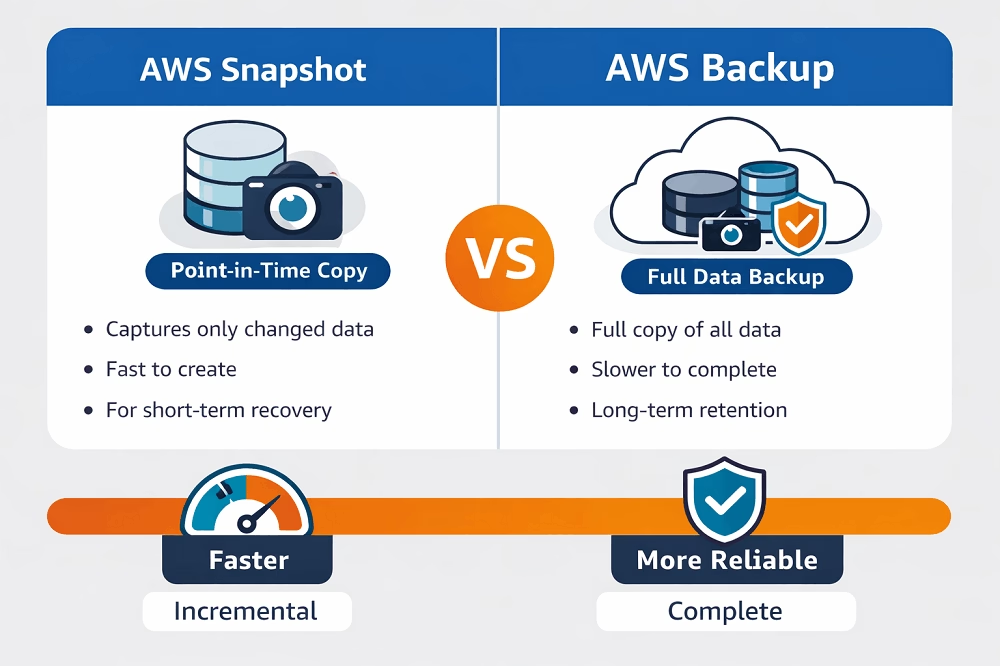
Snapshots are a quick “picture” of the documents system on your web server. This image covers everything about the webserver, including the time it was taken. Snapshots can be used to restore web servers to the state they were in at the time the Snapshot was taken.
To summarize, the following are the main differences between a server/file backup and Snapshots:
| Backup | Snapshot |
| Backups can be kept in added places, the same drive, or even the same web server. They do not call for off-site as well as on-site storage. | Snapshots need both on-site and off-site storage space and must constantly be stored in the same areas where the initial system information lies. |
| Backups can have distinctions between when the backup started and also finished. | Pictures are “pictures” of your server that preserve it exactly as it went to an offered time. |
| The process of developing backups can be lengthy and tedious. Snapshots are rapid and take a lot much less time to complete. | Snapshots take much less time to replicate data as well |
| Backup data only include the data system | Snapshots can be made of different sorts of systems. These consist of documents, applications, setups, and so on. |
| Backups exist in different details places and can quickly be brought back. Backups are also usually verifiable. | Snapshots are not exactly backups. They can be used as part of the backup process (and need to be) but are primarily temporary options. |
Both Snapshots and backups have their advantages and disadvantages. Nonetheless, it’s normally advised to go with backups if you require long-term insurance coverage. Snapshots are made for temporary usage as well as storage. They are usually only valuable if you need to change to an extremely current variation of your server on the very same framework.
A True Local Backup of Amazon WorkMail
If your primary concern is safeguarding email communication rather than just server configurations, a specialized backup tool is essential. The Shoviv Amazon WorkMail Backup & Restore tool automates the backup process, providing verifiable, long-term archives that Snapshots simply can’t match.
The golden rule of backup is the 3-2-1 strategy: keep your data in more than one location. AWS Snapshots are often tied to the same infrastructure. By using the Shoviv Amazon WorkMail Backup Tool, you can store your email archives locally or on different cloud storage, ensuring your business communication remains accessible even if your AWS region faces an outage.
Wrapping UP
I hope now you are well aware of the AWS Snapshot and Backup. As discussed in the above post, backup is the best option to safeguard your priceless data. Shoviv Amazon WorkMail & Restore tool is the best option; click here to know more about AWS backup tool features.
Frequently Asked Questions
While AWS Snapshots are highly reliable for disaster recovery (DR), they may not meet all regulatory compliance standards (like HIPAA or GDPR) that require data to be stored in a separate, independent format or location. A true backup, like one created using a dedicated Amazon WorkMail Backup utility, allows you to store your data in portable formats (PST, EML, or MBOX) on-premises or in a different cloud. This ensures your data remains accessible even if there is a regional AWS outage or an account-level security breach.
AWS Snapshots follow an incremental pricing model, meaning you only pay for the changed data blocks. However, costs can escalate if you retain thousands of old snapshots across multiple regions. Manual or automated File Backups can be more cost-effective for long-term archiving because you can move older data to lower-cost storage tiers (like Amazon S3 Glacier) or local hardware, freeing up your primary AWS resources.
No, AWS Snapshots are generally “all-or-nothing” at the block level. To restore a single deleted email from a snapshot, you would typically need to restore the entire volume or instance to a temporary state, mount it, and then manually extract the data—a process that is both time-consuming and technical. Using a professional backup solution allows for granular recovery, where you can search for a specific subject line or date and restore only that item in seconds.